WSU’s 4+1 accelerated degree programs allow eligible undergraduate students to earn a bachelor’s and a master’s degree while sharing up to six credits between the two degrees. This myWSU pathway lets you apply to a 4+1 master’s program at no cost — no GradCAS or EngineeringCAS application fee required. Review the table of current programs below to see if your undergraduate program qualifies, then follow the step-by-step instructions to apply.
| Undergraduate Degree | *Campus | Master’s Degree | *Campus | **Options | Graduate Coordinator |
|---|---|---|---|---|---|
| BA in Journalism & Media Production | [P, G] | MA in Health Communication & Promotion | [G] | NT | Jeremy Watson |
| BA in Journalism & Media Production | [P, G] | MA in Strategic Communication | [G] | NT | Jeremy Watson |
| BA in Strategic Communication | [E, G, P, V] | MA in Health Communication & Promotion | [G] | NT | Jeremy Watson |
| BA in Strategic Communication | [E, G, P, V] | MA in Strategic Communication | [G] | NT | Jeremy Watson |
| BS in Computer Science | [V] | MS in Computer Science | [V] | T or NT | Diego Murillo |
| BS in Electrical Engineering | [V] | MS in Electrical Engineering | [V] | T or NT | Claire Potter |
| BA in Sociology | [P] | MA in Sociology | [P] | T | Alana Williams |
| BS in Architectural Studies | [P] | Master of Architecture | [P] | NT | Brittanie Halvorson |
| BS in Sports Medicine | [P] | Masters in Athletic Training | [P] | NT | Invitation Only |
| BS in Computer Science | [P] | MS in Artificial Intelligence | [P] | T or NT | Smitha Bose |
| BS in Software Engineering | [P] | MS in Artificial Intelligence | [P] | T or NT | Smitha Bose |
| BS in Computer Engineering | [P] | MS in Artificial Intelligence | [P] | T or NT | Smitha Bose |
| BS in Cybersecurity | [P] | MS in Artificial Intelligence | [P] | T or NT | Smitha Bose |
| BS in Kinesiology | [P] | MS in Kinesiology | [P] | T or NT | Kjelda Berg |
**NT = Non-Thesis, T= Thesis
Student – How to Apply
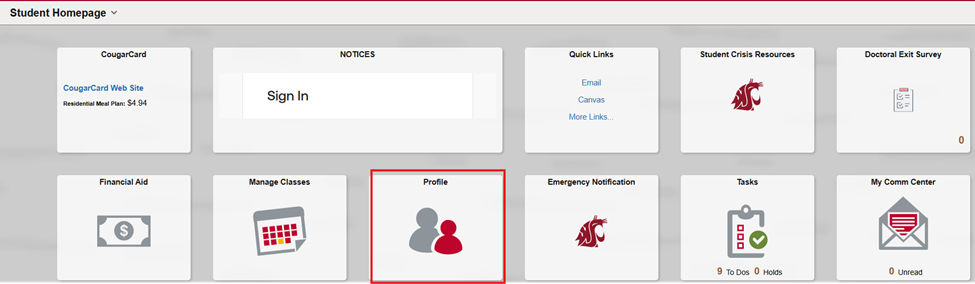
1. Log in to myWSU. On the student homepage, navigate to the Profile tab.
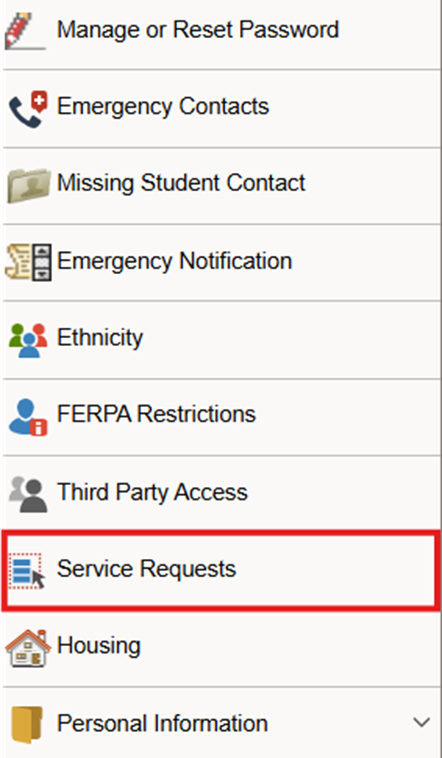
2. On the profile page, click the Service Requests tab on the left side of the screen.
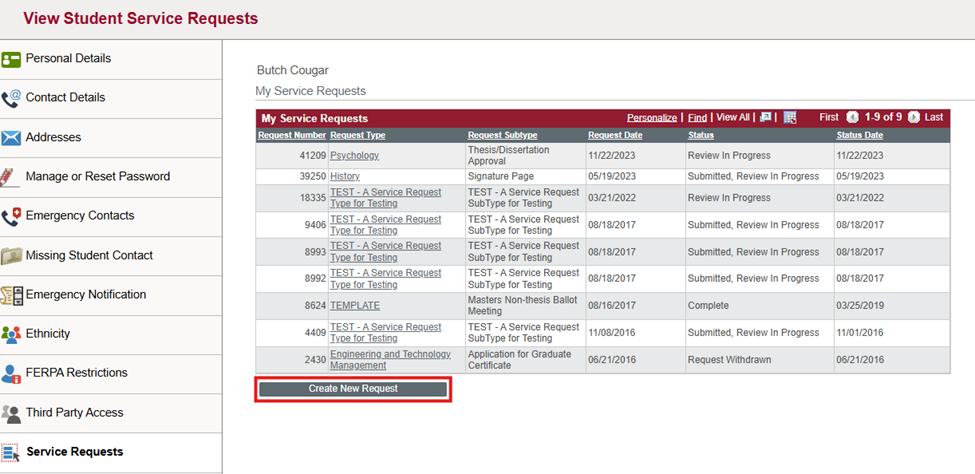
3. On the View Student Service Requests page, click the Create New Request button in the right pane.
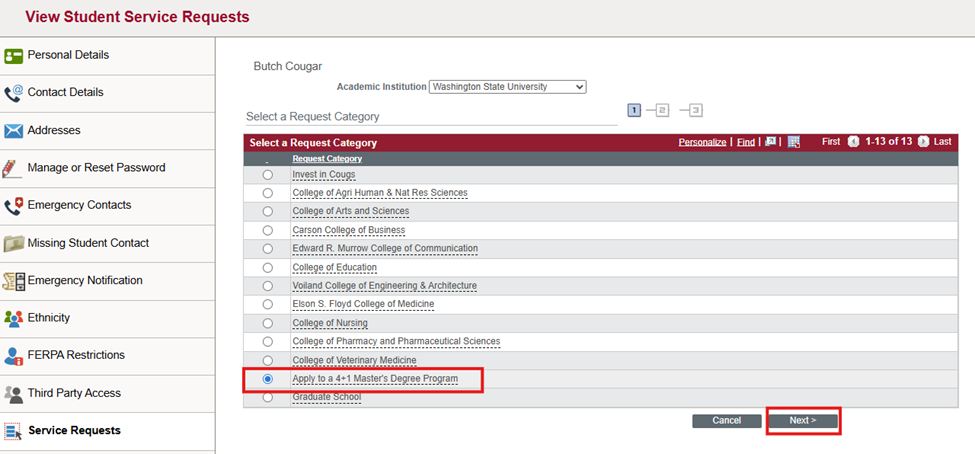
4. On the resulting page, choose Apply to a 4+1 Master’s Degree Program and click Next.
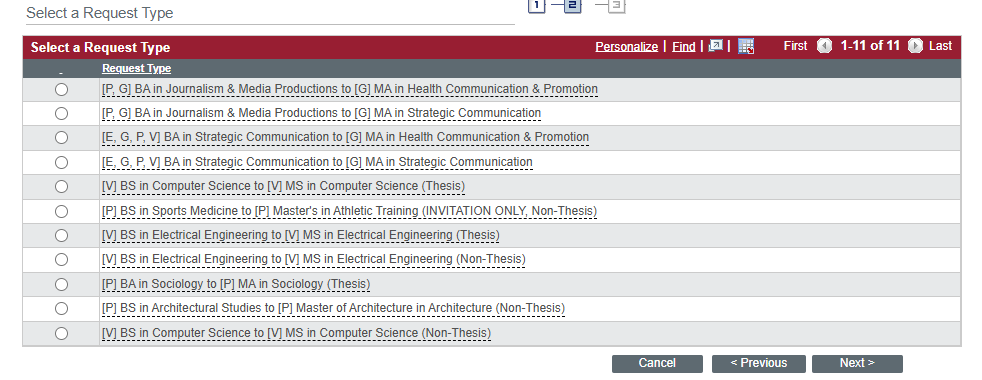
5. Choose a Request Type and click Next.
- Note Campus Code: E = Everett, G = Global, P = Pullman, T = Tri-Cities, S = Spokane, V =Vancouver
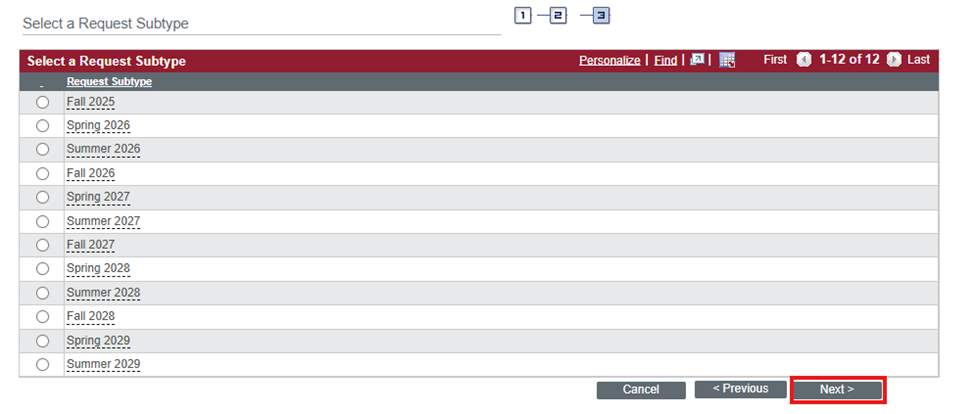
6. Choose a Request Subtype (the term you are applying for) and click Next.
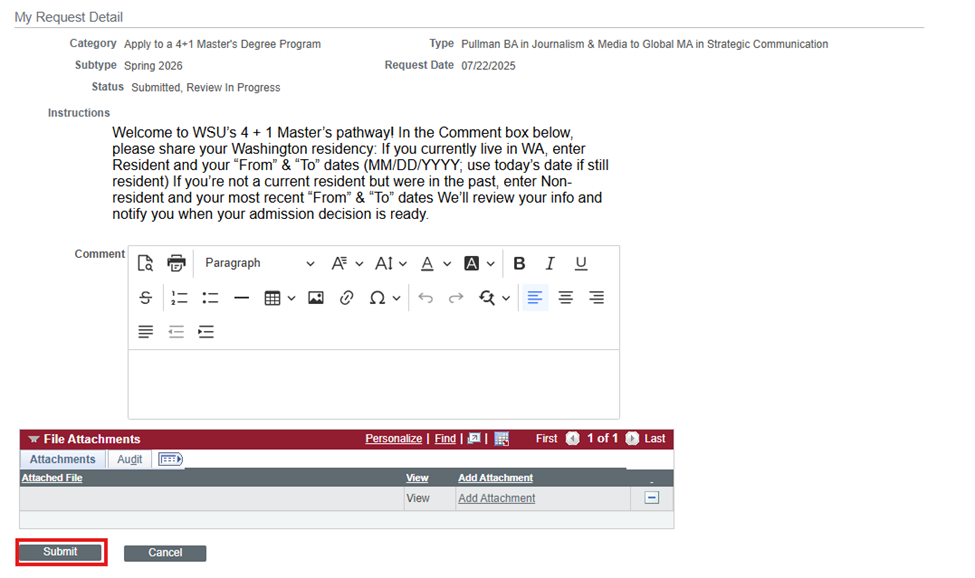
7. On the Request Details page, enter your residency information in the comment box and click Submit.
Once your service request has been submitted, your departmental graduate coordinator will review it. If approved, an application will be created in myWSU. Check with the graduate coordinator listed in the programs table above to determine your status in the application process.
Graduate Coordinator – How to Manage 4+1 Admissions
The 4+1 accelerated degree pathway allows eligible undergraduate students to transition to a master’s program while bypassing the application and fee in GradCAS or EngineeringCAS. No graduate application exists initially—the undergraduate Service Request triggers the creation of the graduate record.
Part 1: Service Request Review (Undergraduate Level)
When a student submits a 4+1 Service Request, you will receive an email notification.
01_Submitted (Submitted by Student).
05_4PLUS_APP– Approve: Initiates the automated background process to generate a graduate application record in myWSU.21_DENY_RTS– Deny: Denies the request (e.g., student does not meet credit or semester standing requirements).23_INFO_RTS– Return to Student: Sends the request back to the student for corrections or term clarification.
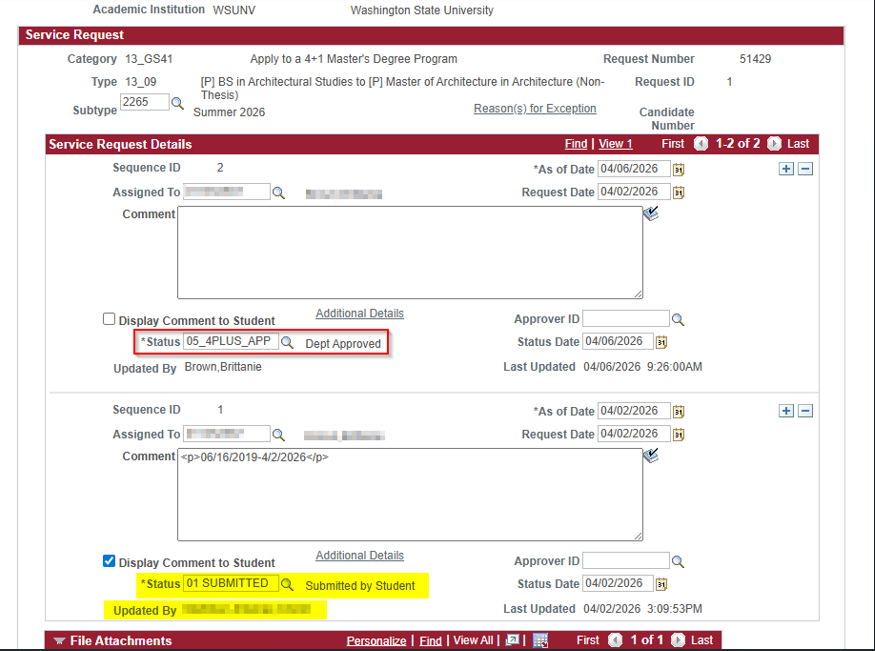
- Approve only once: Approving a second time or re-submitting disrupts the routing system.
- Do not add comments to the
05_4PLUS_APPapproval row. - Do not check “Display Comment to Student.” Adding text or checking this box corrupts the automated staging script.
Part 2: Application Evaluation & Admission Recommendation (Graduate Level)
Once the application clears staging, it transitions from the undergraduate record into your graduate evaluation queue.
- Once the Graduate School processes the admission decision, the student is officially matriculated.
- Because 4+1 admits often occur close to the start of the term, coordinators should assist the student with course enrollment immediately to ensure prompt Canvas access and prevent late registration fees.
Troubleshooting & Common Pitfalls
| Issue | Cause | Action Required |
|---|---|---|
| No Grad Application visible yet | Record is still processing in staging. | Wait 24–48 hours after approving the Service Request before checking Application Evaluation. |
| System error during staging | Notes added to approval row or multiple approvals submitted. | Contact the Graduate School/ITS to clear duplicate or corrupted staging rows. |
| Student applied for multiple terms | Duplicate Service Requests submitted. | Use 23_INFO_RTS to clarify or 21_DENY_RTS on invalid terms before approving the correct one. |
| Student missing Canvas access | Student is matriculated but not yet enrolled in sections. | Department coordinator should enroll the student directly in myWSU. |